


Built for Speed, Clarity, and Clinicians
ParaNote is an ambulance ePCR designed to match how paramedics actually work. Ultra-fast input, minimal taps, and intelligent workflows that reduce documentation load when it matters most.
Streamline thinking during pressure. Capture complete patient records. Focus on care, not clicks.
Contact Us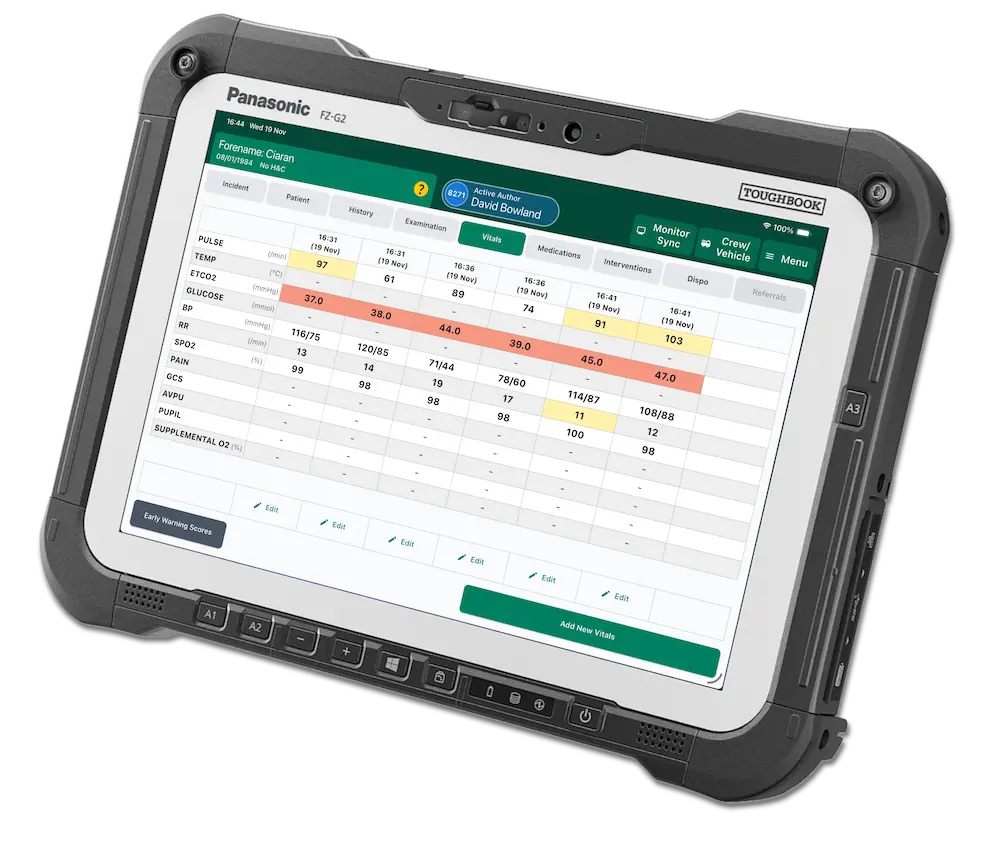
See ParaNote in Action
See a complete incident captured end to end in ParaNote — from patient identification through to handover.
Know exactly who you're treating
ParaNote starts every record with the patient. Find them in seconds, confirm their identity against trusted sources, and carry verified demographics through the entire incident.
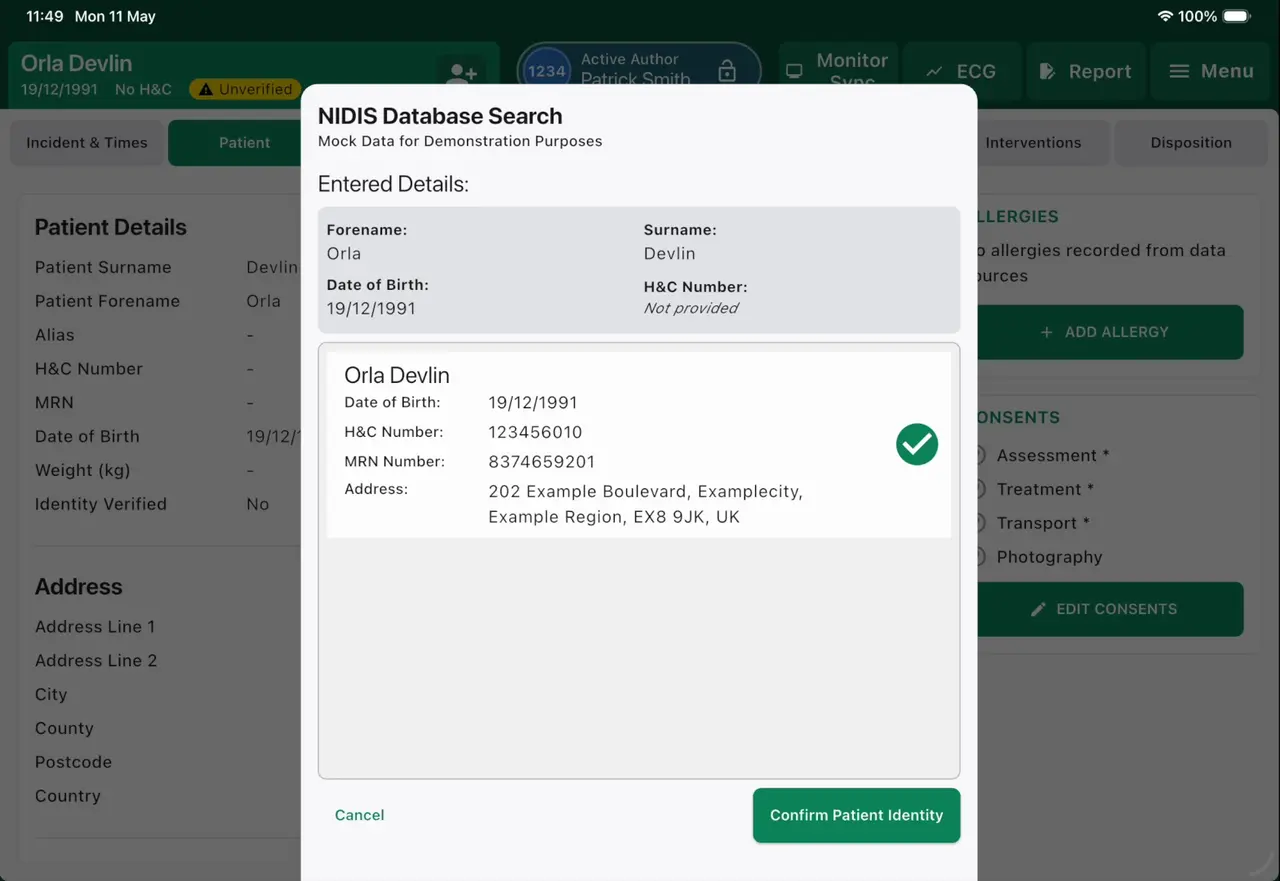
Instant patient search & identity verification
Search by date of birth, name or address and pull a confirmed match directly from local and national records — including NHS and NIDIS database integrations. One tap verifies you have the right person before any clinical detail is recorded.
- Search across local databases and national patient indexes
- Auto-populate demographics, H&C number, MRN and address
- Confirm patient identity in a single, auditable step
- Flags unverified patients so identity is never assumed
Record the scene the way it happened
Structured capture of the details clinicians and receiving teams need — built for the realities of a road traffic collision.
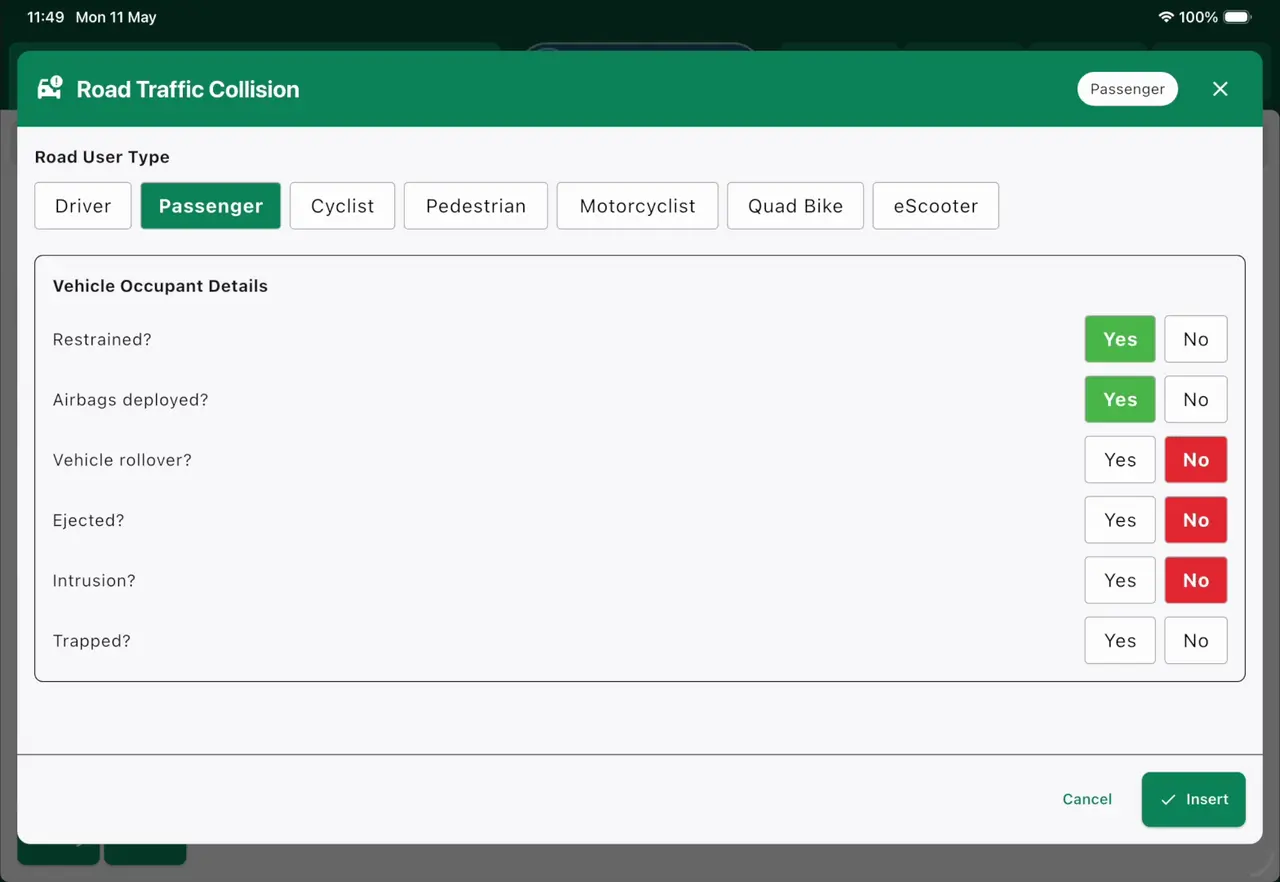
Road traffic collision mode
A dedicated RTC workflow captures mechanism of injury for every road user involved. Record whether occupants were restrained, whether airbags deployed, and capture cyclists, pedestrians, motorcyclists and other parties — fast Yes/No entry keeps documentation moving while the scene is still live.
- Per–road-user capture: driver, passenger, cyclist, pedestrian and more
- Restraint, airbag, rollover, ejection, intrusion and entrapment flags
- High-contrast Yes/No entry for speed under pressure
- Mechanism-of-injury information is clearly presented to support clinician assessment and handover
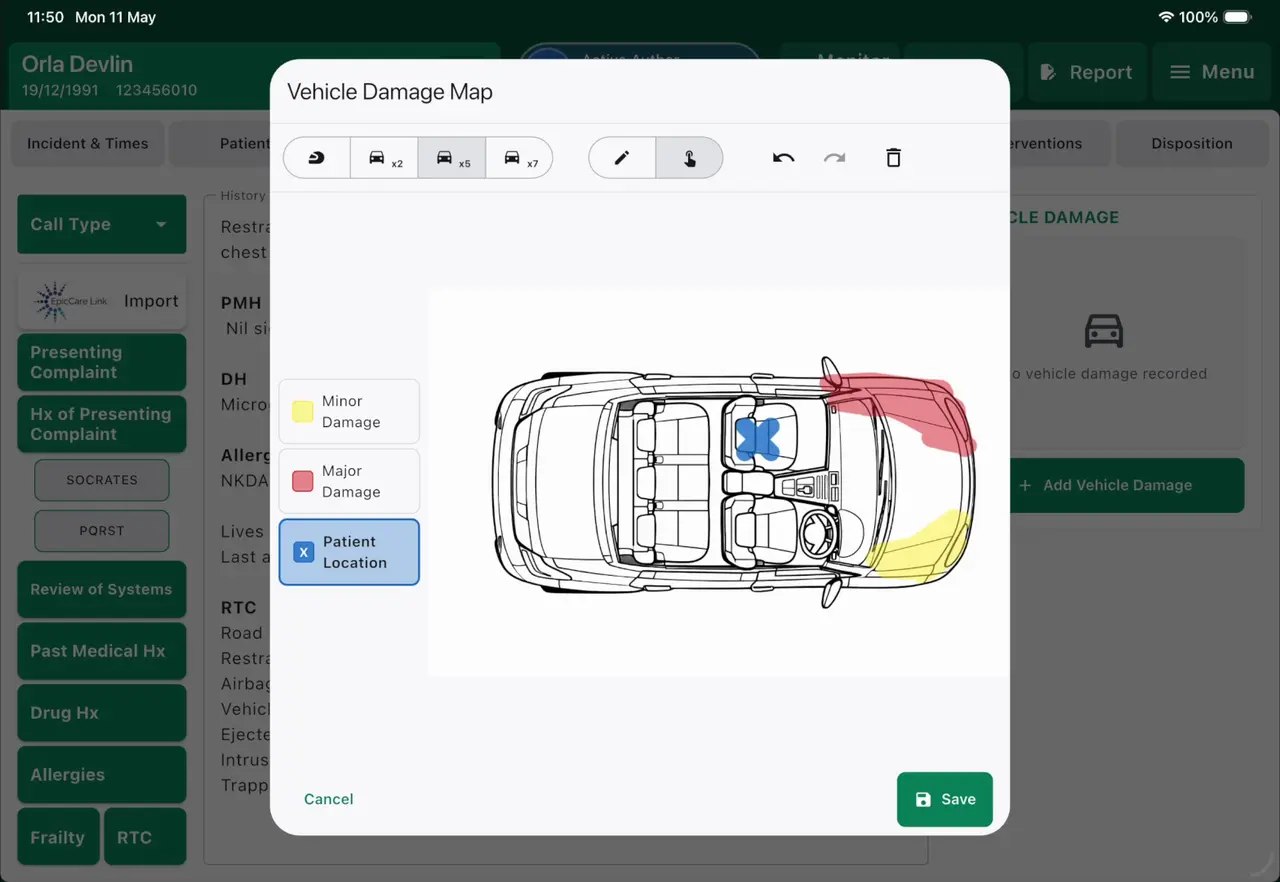
Interactive vehicle damage mapping
Draw directly onto a vehicle diagram to record impact zones, damage severity and the patient's position within the vehicle. A visual damage map communicates mechanism of injury far more clearly than free text — and stays attached to the record for the receiving team.
- Annotate minor and major damage zones by hand
- Mark patient seating position within the vehicle
- Visual mechanism-of-injury evidence for the receiving clinician
- Saved as part of the permanent patient record
Vitals captured in real time, trended at a glance
Pull readings straight from the monitor, log fresh obs in seconds, and see the whole clinical picture trend across the incident.
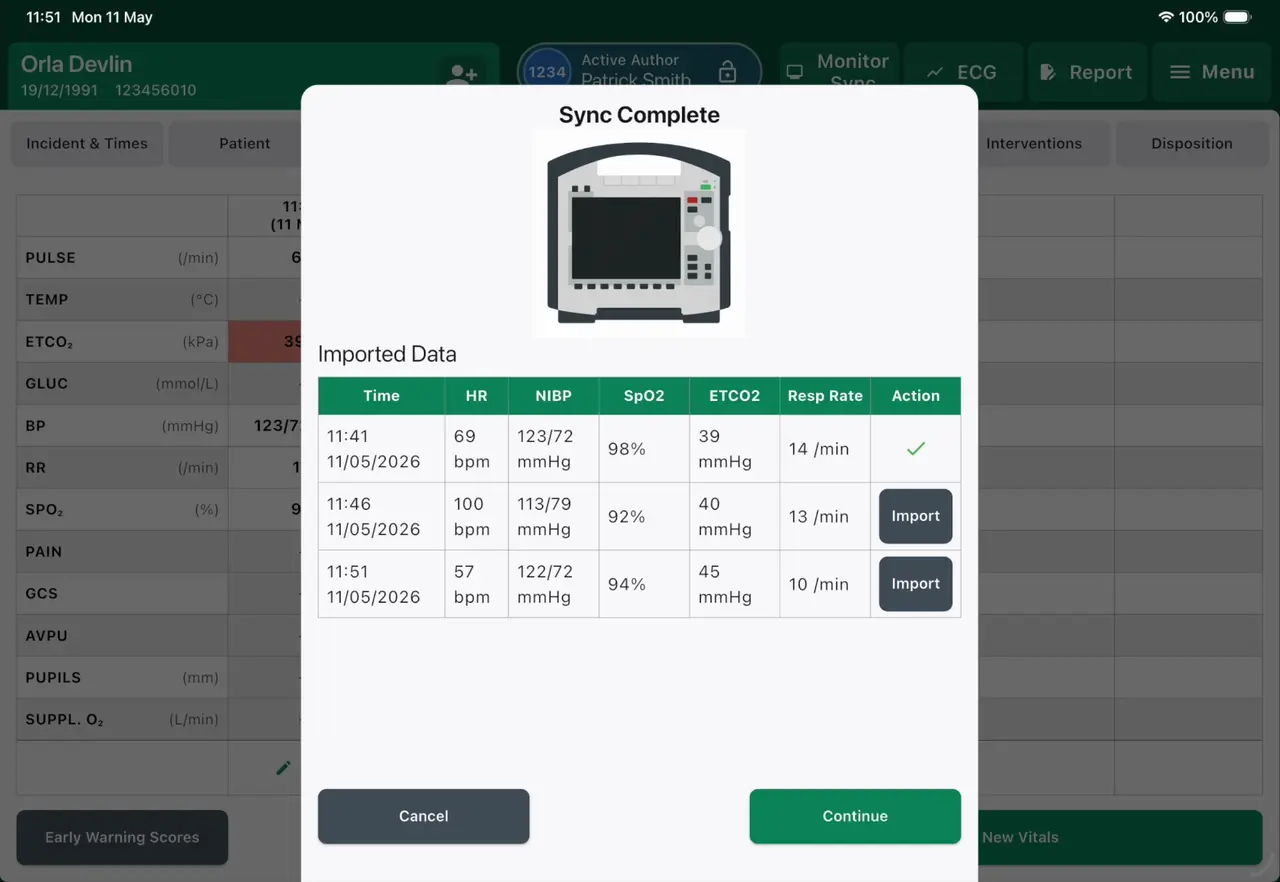
Rapid obs entry with live monitor sync
Capture a full set of observations through a quick-entry flow built for maximum speed, or let ParaNote pull vitals automatically in real time from a connected monitor. Imported readings are reviewed and confirmed before they enter the record, so the data is always clinician-verified.
- Automatic monitor sync for HR, NIBP, SpO₂, ETCO₂ and resp rate
- Review-and-import workflow keeps the clinician in control
- Timestamped readings with zero manual transcription
- Quick-entry path when manual capture is faster
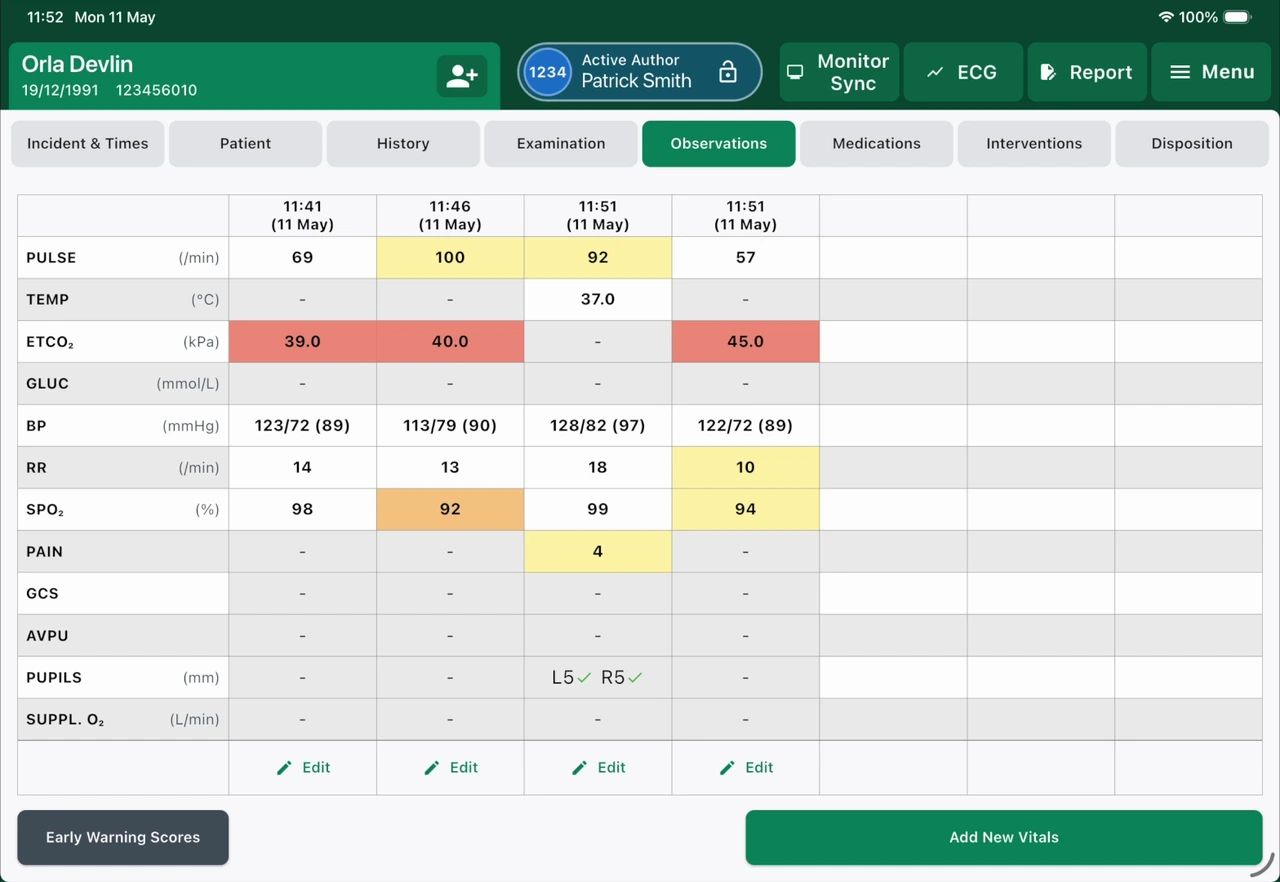
Detailed observation history & trends
Every set of obs lines up side by side so clinicians can read the patient's trajectory at a glance. Observation trends and Early Warning Scores are presented together, turning a column of numbers into a clear overview for the clinician to interpret.
- Side-by-side timeline of every recorded observation set
- Consistent, legible presentation of every recorded value
- Early Warning Scores calculated from the recorded observations
- Clearly visualise observation trends and Early Warning Scores to support clinician assessment
Safe, fast, fully accountable drug records
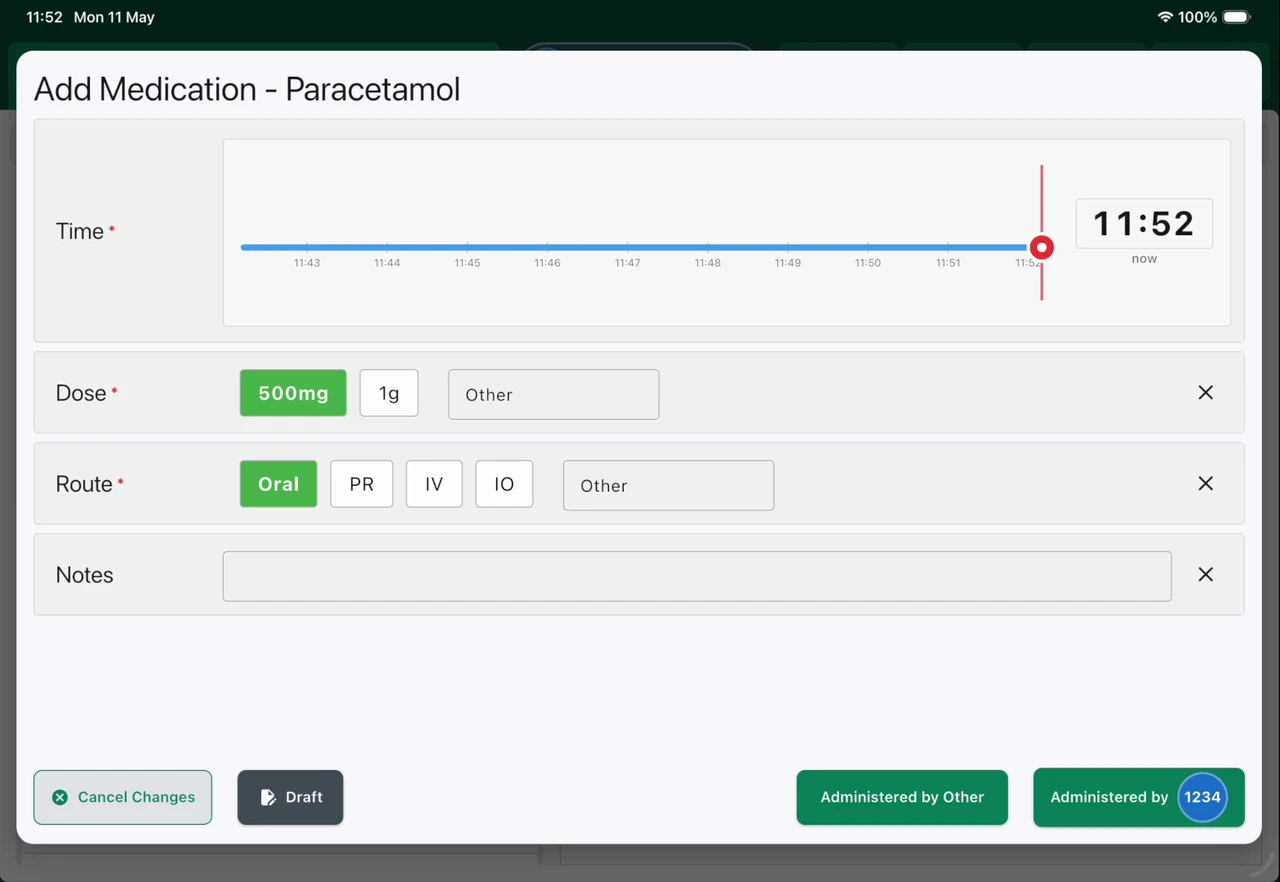
Rapid medication entry with controlled-drug governance
Add medications in seconds with a precise time slider that records exactly when a drug was given and who administered it. Dose and route are one-tap selections, and controlled drugs prompt for the witnessing requirements you need to stay compliant — without slowing you down.
- Precise time-of-administration slider, defaulting to 'now'
- One-tap dose and route selection
- Records administering clinician for every drug
- Built-in witnessing prompts for controlled drugs
From 12-lead to cath lab, without losing time
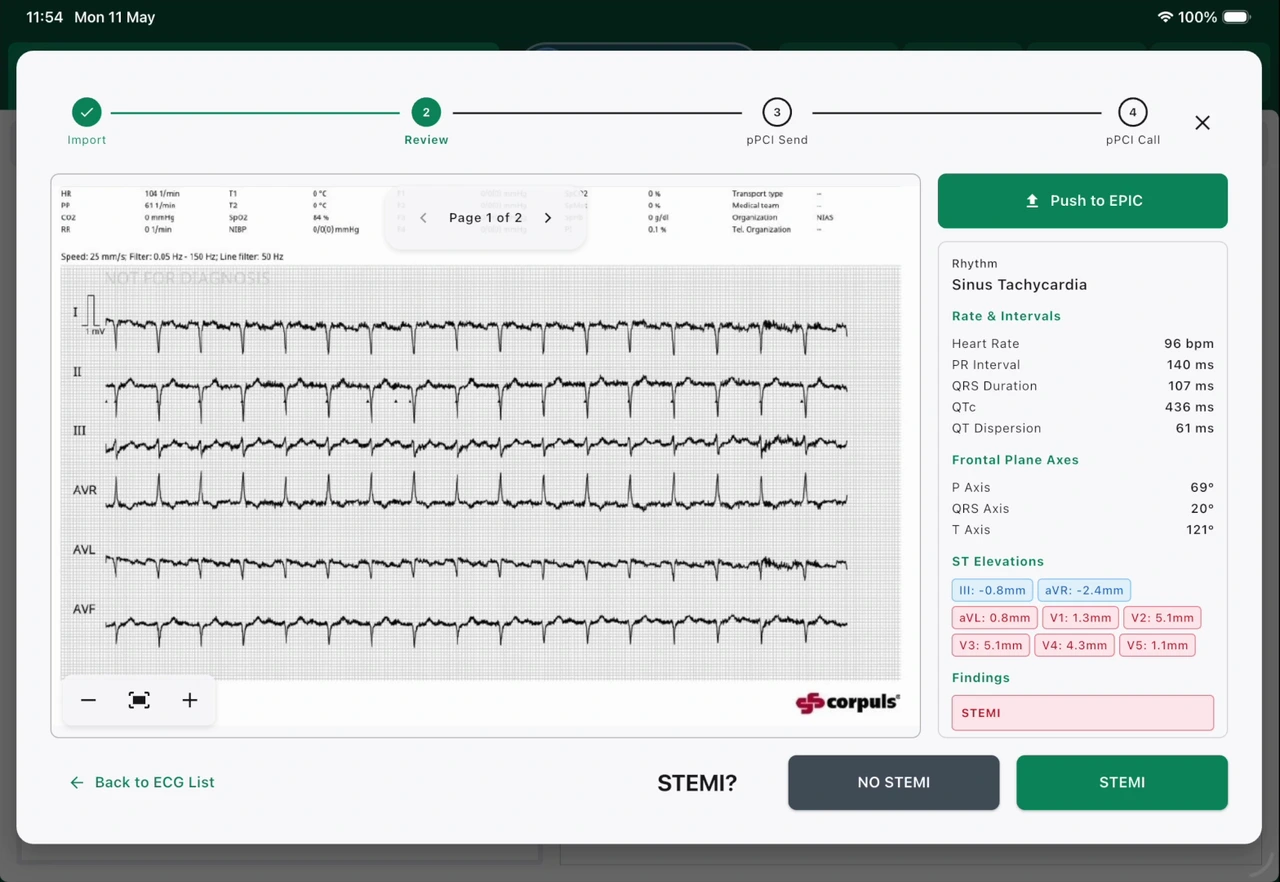
ECG download & STEMI pathway
Download 12-lead ECGs and full PDF reports directly from monitors including corpuls and ZOLL, complete with the monitor's own automated analysis. Where the clinician records a STEMI assessment, ParaNote supports the STEMI pathway — enabling a pre-alert to the receiving team ahead of transfer to the cath lab.
- Direct ECG and PDF report download from corpuls and ZOLL
- Carries the monitor's automated interpretation into the record
- One-tap recording of the clinician's STEMI / No STEMI assessment
- Enables rapid cath-lab pre-alert following clinician confirmation
Close the loop with a clean handover
Everything needed to hand the patient over and keep their care connected — referrals, signatures, leaflets and a report that's ready for the hospital before you arrive.
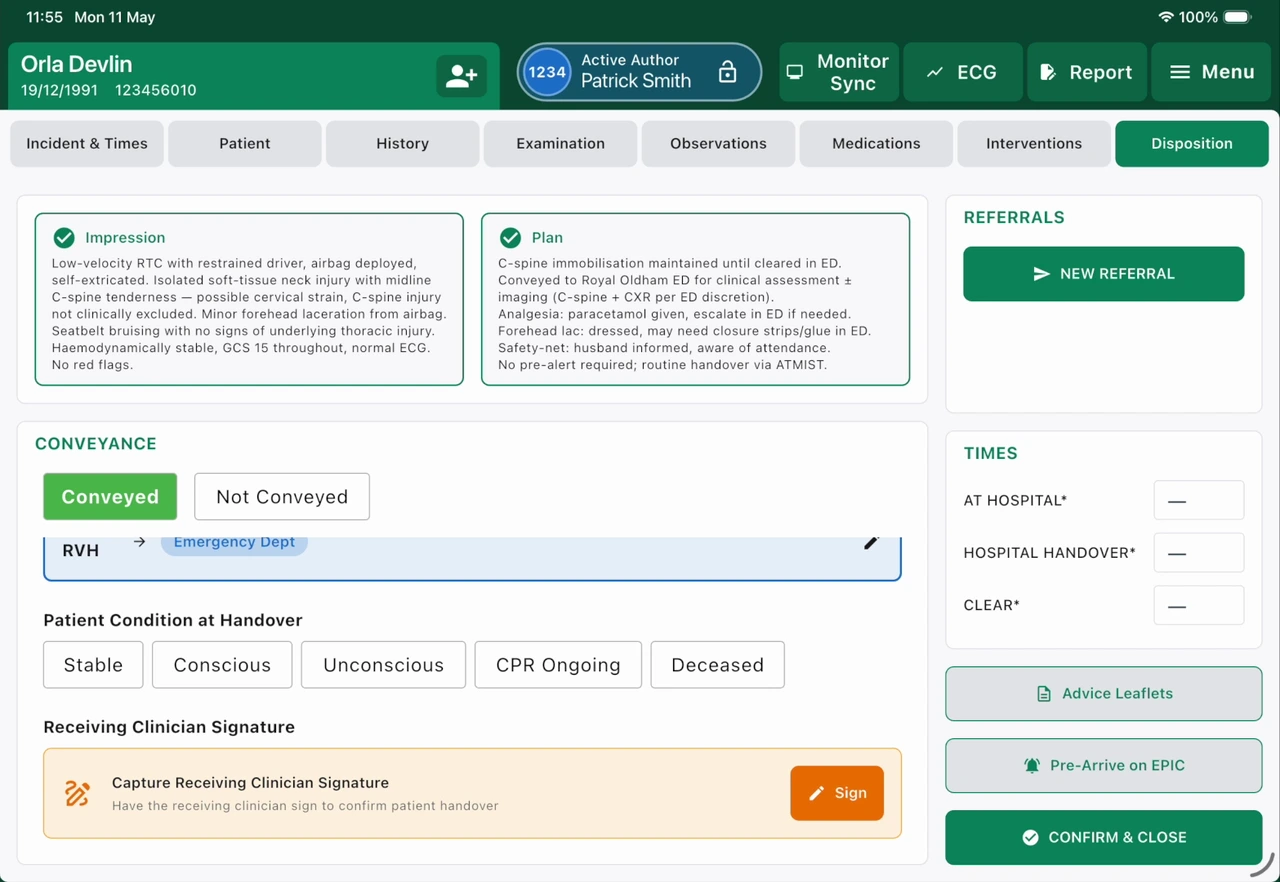
Disposition & handover in one place
The disposition workflow captures conveyance, the patient's condition at handover, and a receiving-clinician signature with precise timings — turning the most error-prone moment of the job into a clean, accountable handover. Send patient advice leaflets digitally, pre-arrive on EPIC, and trigger GP communications all from a single screen.
- Capture conveyance, destination and condition at handover
- Receiving-clinician signature with accurate handover timings
- Digitally send patient advice leaflets
- Pre-arrive on EPIC and notify the GP from one place
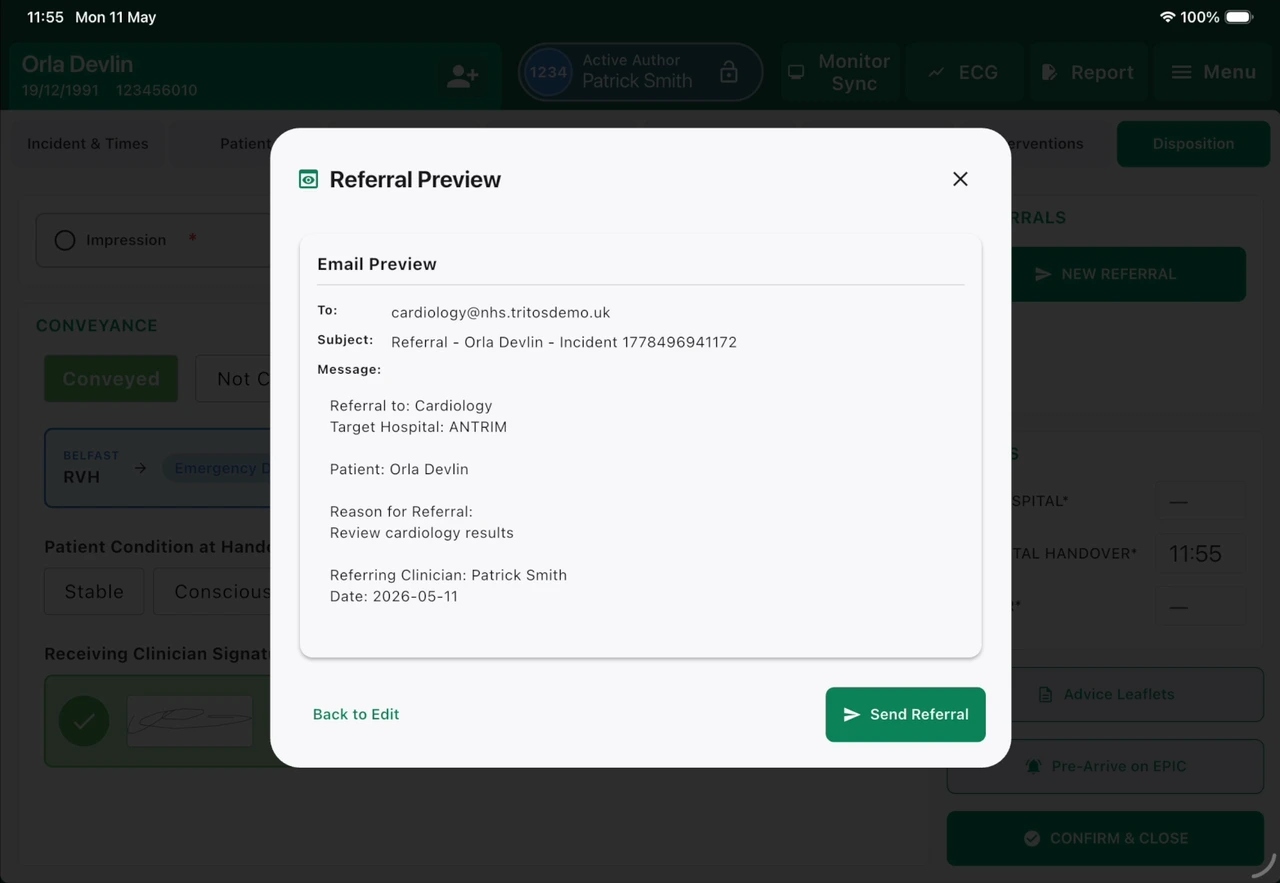
Structured referrals to GPs & specialists
Generate a referral with all the pertinent clinical detail pre-filled, preview the exact message before it goes, and send it securely to a GP, specialty or receiving hospital. The referrals module keeps onward care moving without the phone tag.
- Pre-populated referrals from the live patient record
- Preview the full message before sending
- Route to GPs, specialties or named receiving units
- Every referral logged against the incident
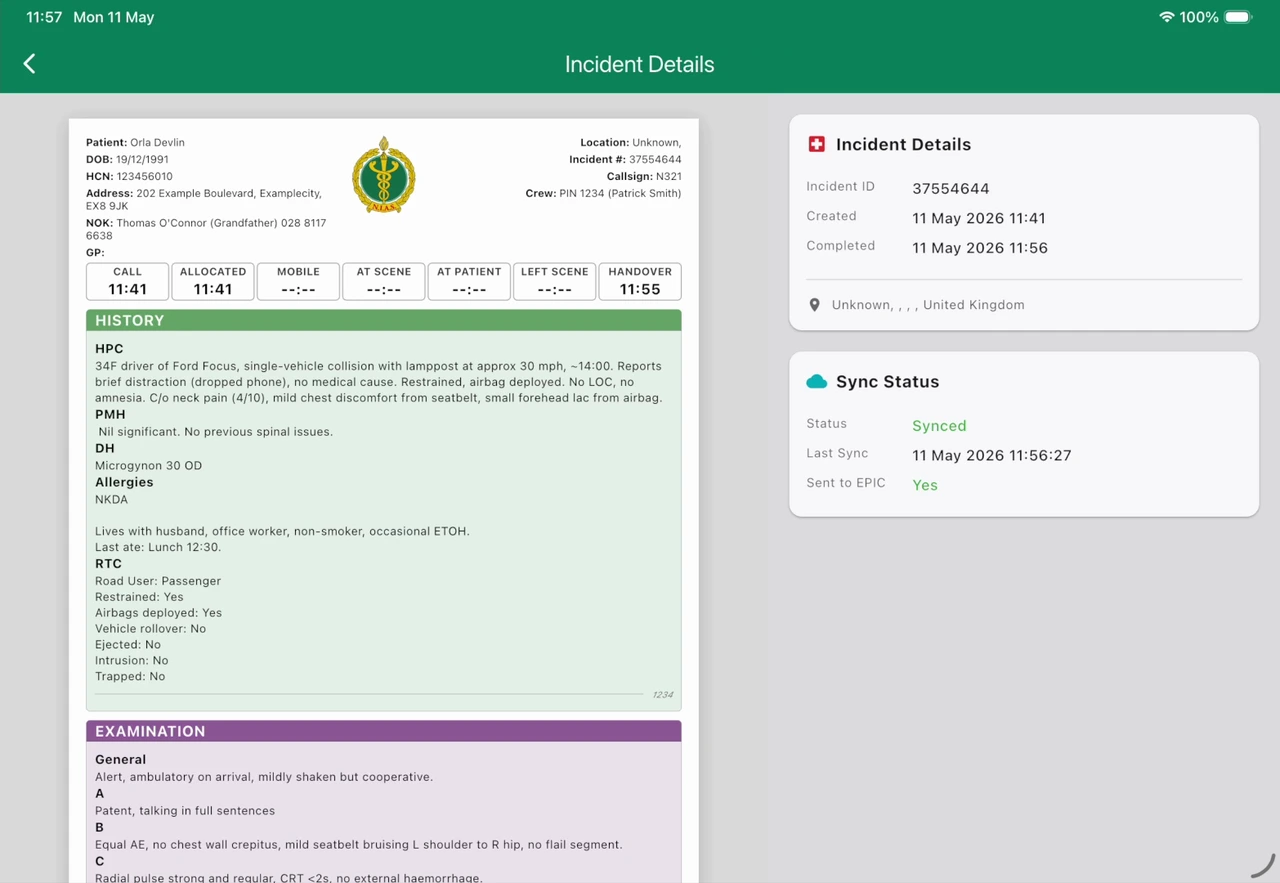
Concise report, complete data underneath
ParaNote produces a clean, easy-to-read PDF report designed to be digested in seconds by anyone who needs it — while deeply integrating into hospital systems such as EPIC. The summary stays concise, but every individual data point is retained underneath for future analytics and audit.
- Concise, readable PDF for rapid clinical handover
- Deep integration with EPIC and major EPR systems
- Full granular data retained for analytics and auditing
- Live sync status so you know the record has landed
Command, triage and accountability at scale
When a single incident becomes many patients, ParaNote switches into Major Incident mode — coordinating the scene, tracking every casualty and recording a complete log for the inquiry that follows.
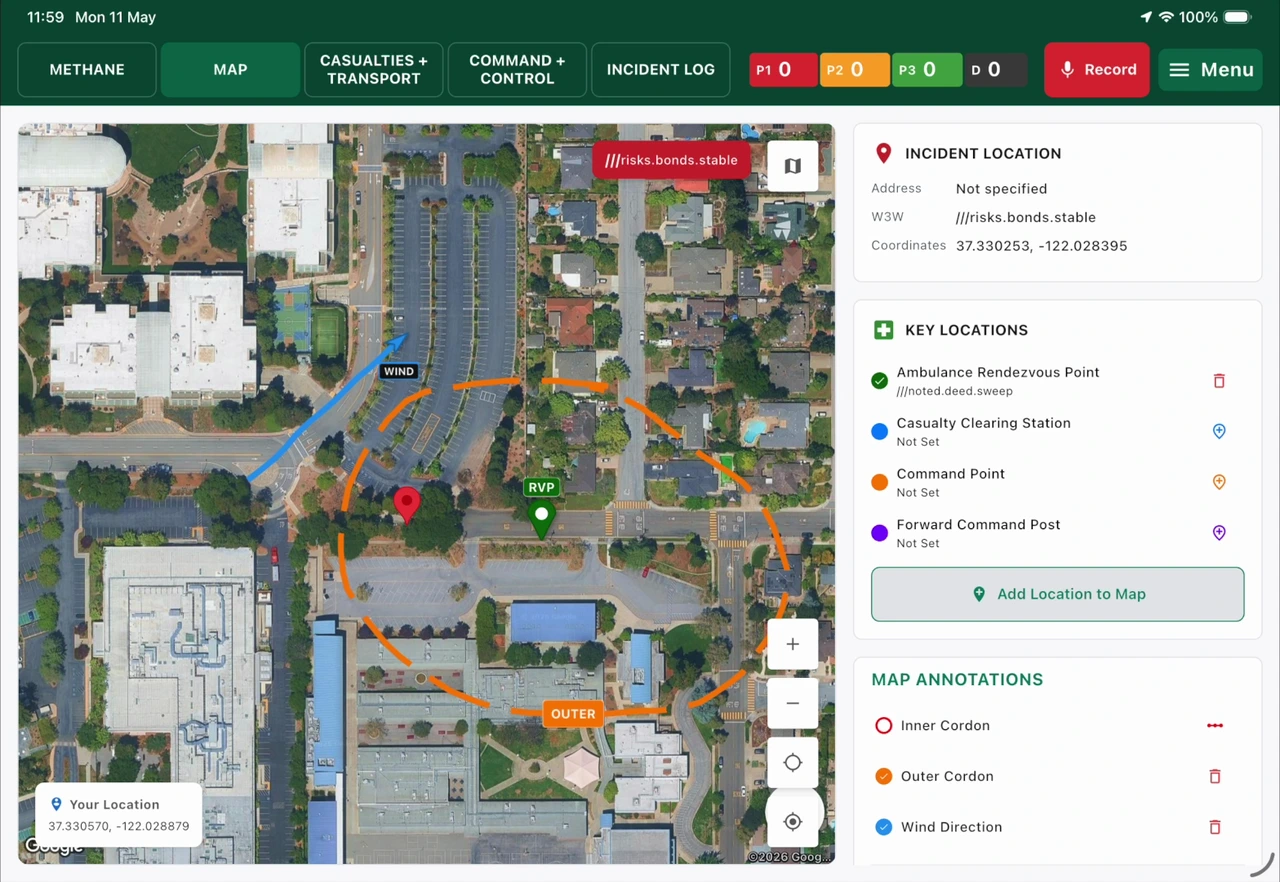
Scene management & live mapping
Major Incident mode supports full scene management — mark cordons, rendezvous points, casualty clearing stations and command posts on a live map. Annotations synchronise in real time across every device on scene, so commanders, crews and incoming resources all share one common operating picture.
- Mark cordons, RVPs, casualty clearing stations and command posts
- METHANE reporting and structured incident logging
- Real-time synchronisation across all devices on scene
- One shared operating picture for the whole response
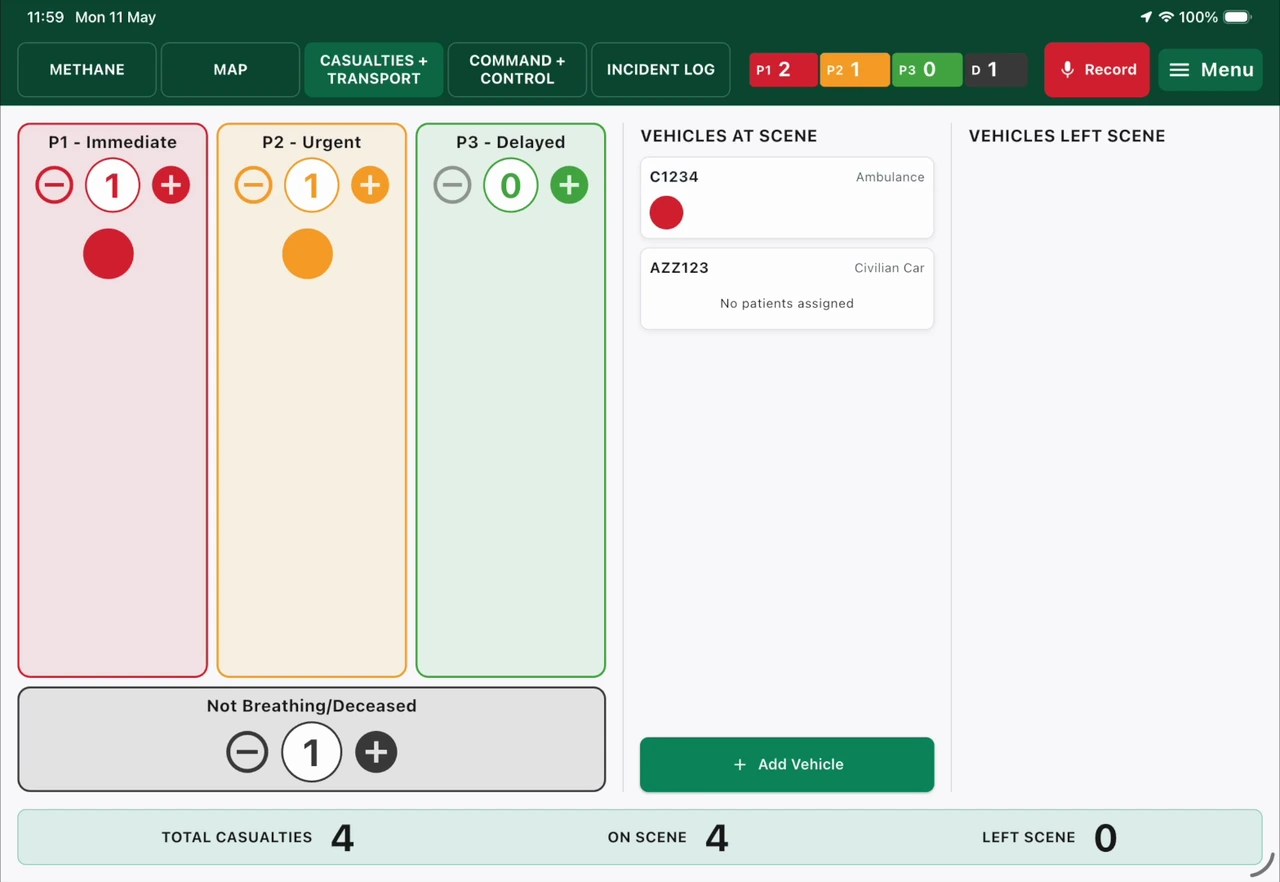
Casualty triage status & asset tracking
A high-level triage board tracks casualty numbers across P1, P2, P3 and deceased categories, and follows where each patient is transported. Track ambulances, police and even civilian vehicles as assets — so command always knows how many casualties are on scene, how many have left, and on what.
- Live counts across P1 / P2 / P3 and deceased
- Track patients to their transporting vehicle and destination
- Manage ambulance, police and civilian vehicle assets
- Instant on-scene vs. left-scene casualty totals
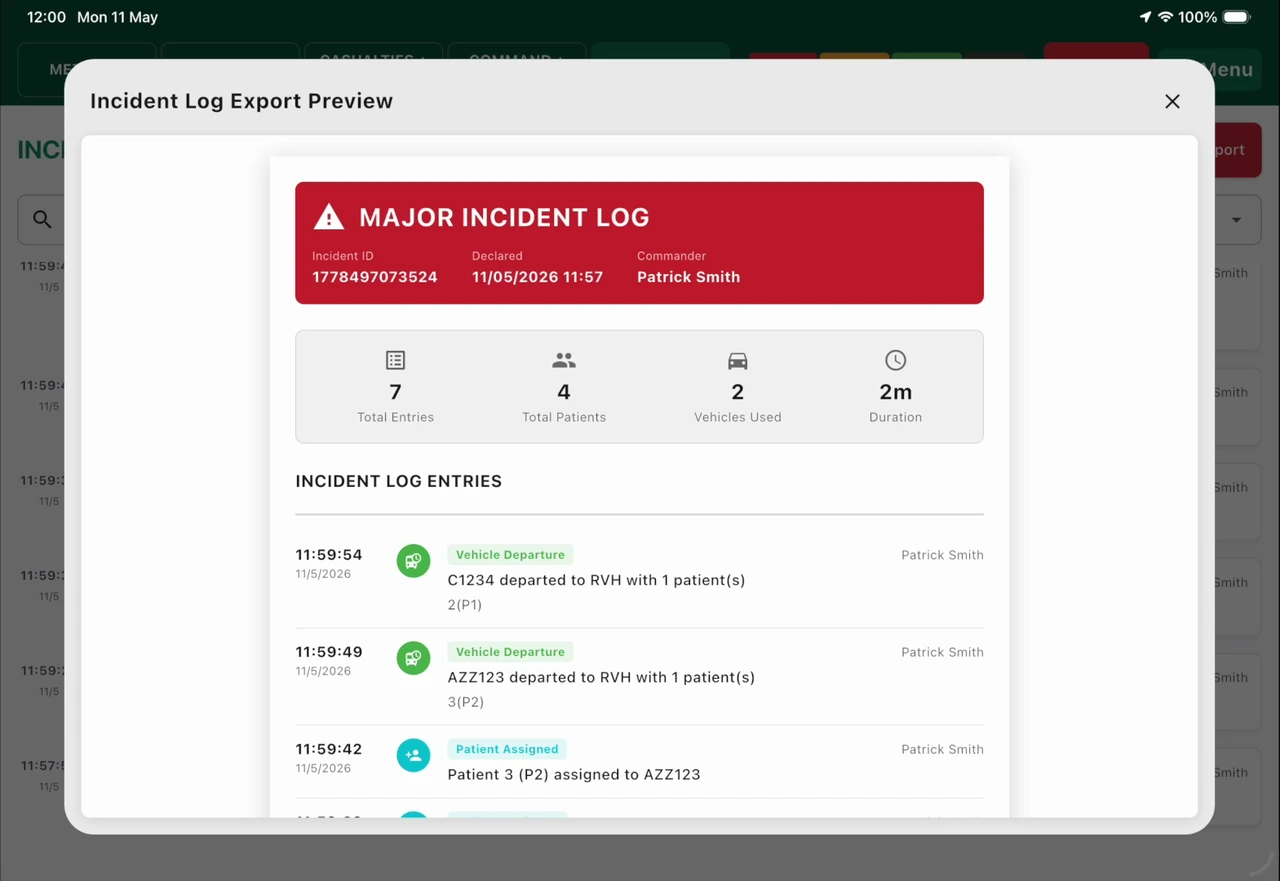
Complete major incident log
Every action during the incident is captured in a time-stamped, attributed log — vehicle departures, patient assignments, triage changes and more. The exportable log gives a defensible, minute-by-minute record for post-incident analytics, debrief and audit.
- Time-stamped, attributed entry for every action taken
- Captures departures, assignments and triage changes
- Headline metrics: entries, patients, vehicles and duration
- Exportable record for debrief, analytics and audit
Arrest Narrator
Revolutionary real-time timeline for cardiac arrest and resuscitation events. Automatically tracks timestamps, drug cycles, interventions, and ROSC events.
- Auto-timestamps every intervention
- Intelligent drug cycle tracking
- Complete arrest documentation in seconds
- Clear audit trail for clinical review
Designed for High-Pressure Environments
When every second counts, ParaNote's Arrest Narrator keeps a perfect record while your team focuses on the patient. No more trying to reconstruct timelines after the fact.
Built by clinicians who understand that cardiac arrests are chaotic—but documentation doesn't have to be.
Why ParaNote?
Because documentation shouldn't slow you down. ParaNote is built on a simple principle: technology should adapt to clinicians, not the other way around.
Minimal Training
Intuitive design means your team is productive from day one.
Clinical Focus
Every feature designed with paramedic input and real-world workflows.
Continuous Evolution
Regular updates based on frontline feedback and emerging needs.
About ParaNote
ParaNote is a clinical documentation and workflow system for ambulance services. It records, presents and transmits information entered or confirmed by a clinician, and supports the operational pathways a service already follows. ParaNote does not diagnose, does not interpret patient data, and does not make or recommend clinical decisions.
Early Warning Scores and any other calculated values are presented as documentation aids and must be interpreted by a clinician. All clinical assessment, decision-making and escalation remain the responsibility of the treating clinician, in line with local protocols and guidelines.
Ready to See ParaNote in Action?
Get in touch to learn more about how ParaNote can transform documentation for your ambulance service.
Contact UsWhat to Expect
- Personalised demonstration
- Discussion of your specific needs
- Integration and deployment planning